How to Choose the Best Wireless Video Transmission System

Time:2026-11-01 Author:Charlotte
0%

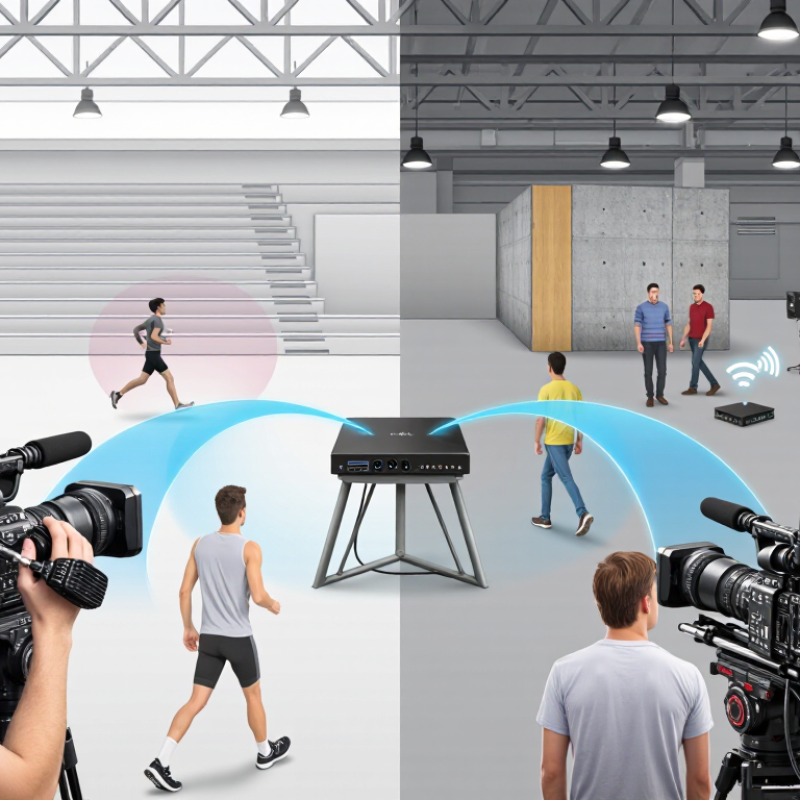
Choosing the best wireless video system begins with the production, not the product brochure. A camera operator filming a moving subject needs different performance from a studio team sending a signal across a fixed room. Video Wireless Transmission must preserve a usable picture while balancing range, latency, reliability, and setup time. One detail matters immediately: a clear line of sight can help, but people, walls, and nearby wireless equipment may still disrupt a link.

The communications theorist Claude Shannon wrote, “The fundamental problem of communication is that of reproducing at one point either exactly or approximately a message selected at another point.” His insight offers a useful lens for comparing video links: assess what arrives at the receiver, not just the transmitter’s advertised range. Check supported resolution and frame rate, operating frequency, latency, encryption options, power needs, and receiver outputs. Then test the system in the actual venue, with the cameras, monitors, and competing signals you expect to use. A spec sheet can still mislead.

Small checks matter. Watch for dropped frames, delayed monitoring, or unstable connections as people move through the space. Confirm that antennas can be positioned properly and that batteries last through a real shooting block. For critical work, consider a backup path and verify local frequency requirements before deployment. There is no universal winner; the right choice depends on the workflow and environment. And sometimes, the “best” system is simply the one your crew can configure correctly under pressure. That deserves a second thought.
How to Choose the Best Wireless Video Transmission System

Define Video, Range, and Latency Needs: 4K Requires 15–25 Mbps

Choosing a wireless video transmission system starts with bitrate, not advertised distance. A 4K feed usually needs 15–25 Mbps, depending on frame rate, compression, color depth, and scene movement. Published streaming guidance places Ultra HD near 15 Mbps, while ITU-T H.265/HEVC documentation confirms that required bitrate varies with encoding conditions. Do not treat 15 Mbps as a promise. Fast camera movement, HDR, and 4K at 60 frames per second can consume substantially more bandwidth.

Leave practical headroom. A 25 Mbps transmission may become unstable when interference, retransmissions, or multiple devices share the channel. I normally test with at least 20–30% spare capacity. Small details matter. A crowded exhibition hall can be more difficult than an open field. Walls, metal structures, antenna placement, and line of sight may reduce range sharply. The 2023 Mobile Traffic Outlook reported that video represented roughly 73% of mobile data traffic, showing how heavily networks are already loaded by visual content.

Latency deserves equal attention.

Live camera operation often feels responsive below 50 milliseconds, but remote control may require stricter performance. Measure glass-to-glass delay, not only transmitter specifications. That includes camera processing, encoding, wireless transport, decoding, and display delay. My earlier test plans focused too heavily on range. That was a mistake. A long-distance link is not useful if the picture freezes during a critical movement. Test the exact camera, resolution, frame rate, and environment before selecting equipment.

Compare Wireless Standards: Wi-Fi 6 Reaches 9.6 Gbps Theoretically

Choosing a wireless video transmission system starts with the standard, not the advertised speed. Wi-Fi 6 can reach 9.6 Gbps theoretically, but this figure combines multiple streams under ideal conditions. A single camera rarely receives that full capacity. Real throughput falls with distance, walls, channel congestion, and connected devices.

Numbers can mislead. Wi-Fi 5 may handle basic 1080p video, especially across a short, clear path. Wi-Fi 6 improves efficiency in crowded networks through better scheduling and higher modulation. Its lower latency can help live monitoring and camera control. Wi-Fi 6E adds access to the 6 GHz band, where interference may be lower. However, its range can shrink through concrete walls. A clear spectrum survey matters more than a large number on a box.

In practical installations, I check the required bitrate, frame rate, compression, and backup capacity. A 4K feed at high frame rates needs considerably more bandwidth than compressed surveillance footage. I also test the link at the actual mounting height, not beside the access point. Leave room for retransmissions. A crowded warehouse can turn a strong signal into unstable video within seconds.

Dedicated point-to-point radio systems may offer steadier performance over a fixed route, while Wi-Fi is often easier for flexible indoor layouts. My early tests sometimes focused too heavily on peak speed. That was a mistake. Stable delivery, measured latency, and recovery after interference deserve equal attention.

Evaluate Frequency Bands: 5 GHz Offers Range, While 60 GHz Exceeds 1 Gbps

How to Choose the Best Wireless Video Transmission System

Frequency choice shapes every video link. In practical deployments, 5 GHz usually travels farther than 60 GHz. It also handles walls, people, and light outdoor obstacles better. The ITU-R P.676-13 propagation model reports nearly 15 dB/km oxygen absorption near 60 GHz. That loss becomes significant quickly. A clear line of sight is essential.

60 GHz can exceed 1 Gbps with suitable equipment. The IEEE 802.11ad specification defines peak physical-layer rates above 6 Gbps. This capacity supports high-resolution video and low-latency monitoring. However, performance drops sharply when a person crosses the path. A concrete wall can stop the connection completely. Keep antennas aligned, elevated, and within a short indoor distance.

I once assumed a 60 GHz link would outperform 5 GHz everywhere. The result was disappointing. A doorway interrupted the signal, while a 5 GHz link continued operating with lower throughput. Field tests should measure bitrate, latency, packet loss, and recovery time. Use a spectrum analyzer when possible. Repeat tests during movement. Small reflections and blocked paths can change results. That assumption needs testing.

Check Compression and Latency: H.264/H.265 Systems Can Stay Below 100 ms

How to Choose the Best Wireless Video Transmission System

Compression and latency are closely connected, but a codec name alone cannot predict real performance. H.264 and H.265 systems can stay below 100 ms when the encoder, wireless link, and decoder are configured for low delay. That is not guaranteed. Extra buffering, crowded channels, or a long group-of-pictures interval can add noticeable lag. A camera operator may see it as a small pause between moving a hand and seeing that movement on the monitor. Check whether the stated figure measures the full camera-to-display path or only one part of it.

Ask for glass-to-glass test results at your intended resolution and frame rate. Test with a fast pan, fine detail, and changing light; these can expose compression artifacts and delay that a static chart may hide. Compare image quality at the bitrate you can actually sustain, not just the best-case number on a specification sheet. Keep the setup consistent. Then test again in the location where you will work, because walls and nearby wireless traffic can change results. I would not trust one short test alone. Real conditions are rarely tidy, and that detail is easy to overlook.

How to Choose the Best Wireless Video Transmission System

Low-latency H.264 and H.265 workflows can remain below 100 ms when capture, encoding, wireless transport, decoding, and display are carefully optimized.

The chart shows a realistic low-latency system budget for 1080p60 video. H.265 generally uses more processing time than H.264, while both can meet a sub-100 ms target with low-delay settings and a stable wireless connection.

Verify Reliability, Security, and Compatibility Against SMPTE and HDCP Standards

Choosing the best wireless video transmission system starts with verified performance, not attractive specifications. Check whether the system supports the required SMPTE-defined video formats, frame rates, color sampling, and timing. A reliable unit should preserve image quality during movement, interference, and longer operating periods. Request test reports, not only sales claims. Ask how latency, packet loss, and reconnection behavior were measured.

HDCP compatibility also deserves close attention. Confirm that the transmitter and receiver support the required HDCP version and authentication process. Every connected device matters, including cameras, switchers, displays, and converters. A system may work with one monitor but fail after a display change. Check EDID handling, protected-content support, and fallback behavior before installation. SMPTE support does not automatically prove HDCP compliance. These are related, but different, requirements.

Tips: Build a test setup that matches the real venue. Use the intended cables, displays, distances, and nearby wireless equipment. Run continuous video for several hours. Watch for brief black screens, audio drift, or delayed recovery. Keep written results. A checklist helps, but it is not enough. Independent laboratory evidence adds authority, while field testing reveals practical weaknesses. I have found that small compatibility issues often appear only after a full system restart. Allow time for that imperfect reality.

How to Choose the Best Wireless Video Transmission System - Verify Reliability, Security, and Compatibility Against SMPTE and HDCP Standards
Evaluation Dimension Relevant Standard or Requirement Realistic Reference Data How to Verify Recommended Acceptance Criteria
Video Format Compatibility HDMI and professional video-interface compatibility Support should be stated for the required formats, such as 1920 × 1080 at 50/59.94/60 Hz and 3840 × 2160 at 50/59.94/60 Hz. Connect every intended source and display, then test each resolution, frame rate, color format, and bit depth. No black screen, frame-rate conversion, unexpected cropping, or loss of audio during format changes.
HDCP Content Protection HDCP 2.2 or HDCP 2.3, according to the protected-content workflow HDCP 2.2 is commonly used for 4K protected content. HDCP 2.3 is a later revision. Compatibility depends on the complete source-to-display chain. Use a licensed protected-content source and inspect the authentication status at the transmitter, receiver, and display. Authentication completes consistently, protected video is displayed correctly, and no unauthorized content is exposed.
SMPTE ST 2110 Interoperability SMPTE ST 2110 for separate video, audio, and ancillary-data flows over managed IP networks ST 2110 commonly uses RTP transport and requires accurate timing. It is designed for professional media networks and is not itself a wireless transmission specification. Connect the system to a controlled ST 2110 test network and confirm video, audio, ancillary data, multicast behavior, and timing. The system exchanges the required flows without format conversion, unstable multicast behavior, or timing errors.
Timing and Synchronization SMPTE ST 2059 and Precision Time Protocol principles where synchronized IP media is required Professional IP video systems commonly use PTP-based timing. Wireless links must not introduce uncontrolled clock drift or excessive jitter. Measure PTP lock status, offset from the grandmaster, packet delay variation, and long-duration clock stability. All endpoints remain locked for the complete test period, with timing performance within the limits defined by the system design.
Seamless Redundancy SMPTE ST 2022-7 for seamless protection switching, when dual-path operation is required ST 2022-7 uses two independently routed media paths so a receiver can recover from the loss of one path without visible interruption. Interrupt one path during active video and monitor for frozen frames, dropped frames, audio gaps, and recovery behavior. The remaining path maintains continuous output, with no visible interruption or unacceptable audio discontinuity.
End-to-End Latency Application-specific latency target Live production, remote camera control, and interactive monitoring may require glass-to-glass latency below 100 ms. Exact requirements vary by application. Measure from a time-coded source display to the receiving display under normal and congested network conditions. Measured latency remains below the project limit, including encoding, wireless transport, decoding, display processing, and buffering.
Reliability and Packet Loss Application-defined error tolerance and recovery behavior Uncompressed 4K video requires multi-gigabit bandwidth, so many wireless systems use compression, forward error correction, retransmission, or adaptive bitrate control. Apply controlled interference, distance changes, partial obstruction, and network loading while monitoring packet loss and video quality. The system maintains stable output or performs a controlled recovery without repeated disconnects or unacceptable visual artifacts.
Wireless Spectrum Planning Local regulatory requirements and permitted radio bands 5 GHz and 6 GHz operation is subject to country-specific rules, channel availability, power limits, indoor or outdoor restrictions, and interference conditions. Confirm regional approval, channel availability, transmit-power limits, antenna requirements, and coexistence behavior at the installation site. The selected channels are legal, coordinated with nearby systems, and stable throughout the required operating area.
Security of the Wireless Link Modern authenticated encryption and secure key management Look for current authenticated encryption, unique device credentials, protected management access, secure firmware updates, and the ability to rotate keys. Review the security architecture and test authentication, encryption status, unauthorized-access rejection, credential changes, and firmware-signature checks. Video and control traffic are encrypted, default credentials can be changed, and unauthorized transmitters or receivers cannot join the system.
Network Segmentation Operational separation of media, control, and enterprise traffic Professional deployments commonly separate media traffic from management and general data using VLANs, access controls, or physically separate networks. Place the system on the intended network architecture and test permitted routes, blocked routes, multicast boundaries, and management access. Only approved devices and services communicate across defined network boundaries.
Audio and Ancillary Data Required embedded audio, timecode, captions, tally, and metadata workflows Depending on the interface, systems may carry embedded audio and ancillary data alongside video. Support should be verified rather than assumed. Test channel count, sample rate, synchronization, timecode, captions, tally, and any production metadata used by the workflow. All required data remains present, correctly synchronized, and unchanged at the receiver output.
Range and Obstruction Performance Site-specific propagation and line-of-sight requirements Actual range depends on frequency, antenna placement, transmit power, obstacles, reflections, interference, and required bitrate. Test the maximum operating distance, moving subjects, walls, people, equipment racks, and non-line-of-sight locations expected in production. The system meets the required coverage area without repeated link drops, excessive latency, or unacceptable image degradation.
Recovery and Failover Defined behavior after signal loss, power interruption, or temporary interference Recovery time varies by buffering, retransmission, connection management, and application configuration. Remove and restore the wireless path, power-cycle an endpoint, and interrupt the source signal while recording recovery time and output behavior. Recovery is predictable, documented, and within the operational limit without requiring repeated manual intervention.
Interoperability Evidence Documented conformance, test reports, and interface specifications Compliance with SMPTE or HDCP-related requirements should be supported by current technical documentation and test evidence; marketing claims alone are insufficient. Request protocol details, supported profiles, firmware versions, test results, and a written list of limitations or excluded features. The documentation matches observed behavior in an acceptance test using the actual sources, displays, network, and wireless environment.
Lifecycle and Maintenance Firmware governance, configuration backup, monitoring, and spare strategy Wireless performance and security can change after firmware updates, spectrum changes, or network modifications. Test firmware update controls, configuration export, event logging, health monitoring, rollback procedures, and replacement-unit commissioning. Updates are authenticated and controlled, faults are visible to operators, and a replacement unit can be configured quickly.
Selection rule: Choose a system only after it passes a site-specific acceptance test using the exact video formats, protected-content sources, network design, wireless channels, distances, and operating conditions required for production. SMPTE standards define media transport and timing practices, while HDCP defines content-protection behavior; neither standard alone guarantees wireless range, latency, or overall system reliability.

FAQS

How much bandwidth does a 4K video link need?

Plan for about 15–25 Mbps. Fast motion, HDR, and 60-frame-per-second video may need more. Leave spare capacity.

How much extra bandwidth should I allow?

Keep 20–30% headroom when possible. Shared channels and interference can make a 25 Mbps link unstable. I underestimated that once.

What latency is suitable for live camera operation?

Below 50 milliseconds often feels responsive. Remote control may need less. Measure the full glass-to-glass delay, not just the wireless link.

What does glass-to-glass delay include?

It includes camera processing, encoding, wireless transport, decoding, and display time. Test with your actual camera and screen.

Is 5 GHz or 60 GHz better for range?

5 GHz usually reaches farther and handles light obstacles better. A wall or passing person can disrupt 60 GHz.

When is 60 GHz useful?

It can exceed 1 Gbps with suitable equipment. That helps carry high-resolution video, but antennas need clear alignment. Short distances work best.

How can I test a wireless video system?

Use the intended resolution, frame rate, and location. Check bitrate, latency, packet loss, and recovery time. Test while people move.

Why can an open field perform better than a hall?

Walls, metal structures, people, and poor antenna placement can weaken the signal. A crowded hall can be surprisingly difficult.

Conclusion

Choosing a Video Wireless Transmission system begins with matching its performance to the video format, operating distance, and acceptable delay. A 4K stream may need roughly 15–25 Mbps, depending on compression and image complexity, so allow extra capacity for stable delivery. Compare wireless standards as well: Wi-Fi 6 has a theoretical maximum rate of 9.6 Gbps, though real-world speeds are lower. Consider the environment and distance when selecting a frequency band. 5 GHz can offer a practical balance of coverage and speed, while 60 GHz can support very high throughput, often above 1 Gbps, but is more sensitive to obstacles and range.

Also check the video codec, end-to-end latency, and system reliability. H.264 and H.265 compression can help maintain image quality while keeping latency below 100 ms in suitable setups. Finally, confirm that the system supports the required interfaces and complies with relevant SMPTE and HDCP requirements, and test it under actual operating conditions before choosing.


Charlotte

Charlotte

Charlotte is a seasoned marketing professional with a deep understanding of the company's portfolio and a passion for elevating its presence in the market. With a keen eye for detail and a commitment to excellence, she ensures that our professional blog is regularly updated with insightful articles......